
|
Ardtornish NewsletterTerm 1 Week 1 - 2nd February 2024
|

No 1
|
In this issue
Diary Dates
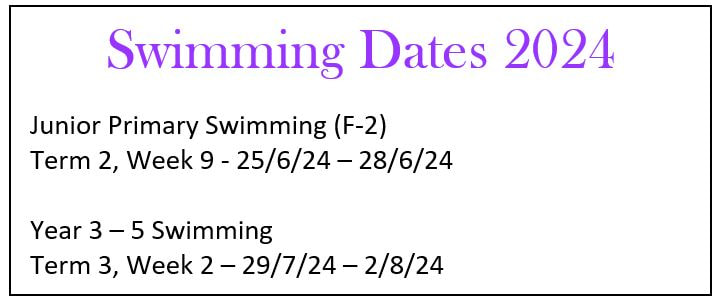
February 6th- Acquaintance Night & AGM 7th – Norwood Pool - Rm’s 4/6/8 12th-14th Arbury Park Camp Rm’s 8 & 11 16th – PUPIL FREE DAY March 1st – SAPSASA Swimming Carnival 7th– Sports Day 11th – Public Holiday Road Crossing
Monitors Wed 31st - Tue 6th Feb Isla G, Sienna H, Rylee B Wed 7th Feb – Tue 13th Feb Rhea Vivek, Molly H, Elih V Wed 14th Feb – Tue 20st Feb Lillee W, Cassidy C, Sovereign H Please arrive by 8.25am |
The Joy of having a Chromebook
|
|
CANTEEN ROSTER
Tuesday 13th Jenni F Wednesday 14th Deborah M Thursday 15th Anna Mc Friday 16th Kristen V Tuesday 20th Jenni F Wednesday 21st Jenni F Thursday 22nd Tui M, Deneice P Friday 23rd Anthea B 

|




Ardtornish Primary School
Annual General Meeting Selecting Parent Representatives Tuesday 6th Feb Time: 8.00pm in the library · Hear about the school’s achievements over the last 12 months · Learn about our future directions · Vote for your representatives on Governing Council. Ardtornish Primary School: Who Makes the Decisions? Our decision making groups At Ardtornish, parents play a key role in the way our school is run. The Principal is responsible for leading the staff and managing the school day to day. The Governing Council makes key decisions affecting the school as a whole. We also have a Student Representative Council, FACE (Fundraising and Community Events) group and Education Group – important groups in their own right. What does Governing Council do? Governing Council discusses significant issues, makes decisions and develops policies for our school within the frameworks set by the Department of Education. Members each have specific roles and coordinate a portfolio group. These groups cover: SPORTS, CANTEEN, FINANCE, GROUNDS AND FACILITIES, EDUCATION and SCHOOL COMMUNITY SERVICE, FACE. Council meets twice a term, usually week 3 & 8. Who is on Governing Council? The Governing Council has 12 members: 9 parent reps, the principal and 2 teacher reps. How do Portfolios operate? Each portfolio relates to a different aspect of the school that the Governing Council takes a direct interest in supporting and or managing e.g. sports, education, canteen, etc. Parent representative on the governing council volunteer to take responsibility for reporting to Governing Council about the work of a particular portfolio during their time in office and coordinate their work. The Portfolio Co-ordinator invites other parents/caregivers outside of the Governing Council to participate on their portfolio to receive input from the school community and to help them with any activities organised throughout the year. Portfolios meet regularly (about once a month/term at conveniently agreed times and places). How can I be involved? Parents can nominate to be a parent representative, with voting rights on the school’s governing council, or they can offer to join a portfolio group to assist in its work. Everyone is welcome to nominate and no prior experience is necessary! Portfolio meetings aim to be very friendly, relaxed and enjoyable. You may like to just attend a meeting or two, to see if it’s for you. Nomination sheets were sent out Tuesday. If you would like to make a nomination and you didn’t receive a nomination sheet, please collect one from the front office. |

Building strong links between home and school begins at Acquaintance Night. Knowing more about school and classroom programs provides caregivers with opportunities to encourage their children to engage more fully with school. Hence your attendance at this year’s acquaintance night is greatly appreciated by all staff.
In their sessions staff provide you with an overview of their classroom program and some of the learning practices your children will engage in. They also explain and answer questions about classroom organisation and routines.
Please come along and hear from your child’s teacher, even if they have been in the class before, as programs and routines change from year to year.
Teachers offer two sessions with a maximum of 15 families per timeslot.
Visit the website below to book your preferred time. Please book as soon as possible.
For parents that do not have internet access, bookings can be made directly through the front office.
Child Care Arrangements for parents who cannot make alternate arrangements
To support families to attend the acquaintance meeting and/or the AGM, we offer limited childcare for families unable to make alternative childcare arrangements.
Please book online through the same link as the Acquaintance Night
Students over the age of 4 are supervised in the library. Younger children cannot be accommodated. After 8.00pm children move to Computer Room 1 to make way for the AGM in the Library.
care in the Library or if after 8.00 pm in Computer Room 1.
----------------------------------------------------------------------------------------------------------------------------------
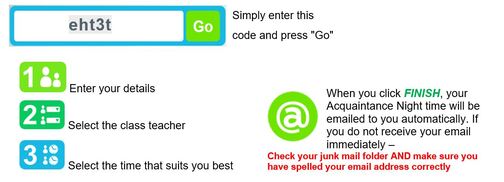
Go to www.schoolinterviews.com.au and follow these instructions.
Building strong links between home and school begins at Acquaintance Night. Knowing more about school and classroom programs provides caregivers with opportunities to encourage their children to engage more fully with school. Hence your attendance at this year’s acquaintance night is greatly appreciated by all staff.
In their sessions staff provide you with an overview of their classroom program and some of the learning practices your children will engage in. They also explain and answer questions about classroom organisation and routines.
Please come along and hear from your child’s teacher, even if they have been in the class before, as programs and routines change from year to year.
Teachers offer two sessions with a maximum of 15 families per timeslot.
Visit the website below to book your preferred time. Please book as soon as possible.
For parents that do not have internet access, bookings can be made directly through the front office.
Child Care Arrangements for parents who cannot make alternate arrangements
To support families to attend the acquaintance meeting and/or the AGM, we offer limited childcare for families unable to make alternative childcare arrangements.
Please book online through the same link as the Acquaintance Night
Students over the age of 4 are supervised in the library. Younger children cannot be accommodated. After 8.00pm children move to Computer Room 1 to make way for the AGM in the Library.
- Students are not able to play in the yard unsupervised and need to be in supervised care.
- School rules apply to all students on the grounds and no bikes / scooters should be brought.
care in the Library or if after 8.00 pm in Computer Room 1.
----------------------------------------------------------------------------------------------------------------------------------
Go to www.schoolinterviews.com.au and follow these instructions.
|

|
